
Developers of custom software and educational simulations.
|
Note: This page is no longer being maintained and
is kept for archival purposes only. For current information see our main page. |
|
|
Kurtz-Fernhout Software Developers of custom software and educational simulations. |
| Home ... News ... Products ... Download ... Order ... Support ... Consulting ... Company |
|
StoryHarp Product area Help System Index Introduction Definitions Tutorials Worlds Agent StoryHarp & IF StoryHarp & Java Registering |
Playing StoryHarp audioventuresWhen you open StoryHarp you will see the player window. The player window stays open the whole time you are using StoryHarp. At the top of the player window is an area called the transcript in which the story unfolds (if you can’t see a transcript, turn the Settings | Show Transcript option on). Below the transcript is a list of commands, or things you can say. To play an audioventure, you say or click on any of the commands in the list.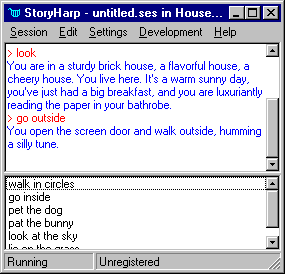 The player window
If you do not want to edit audioventures, you can turn off the editor portion
of StoryHarp using the “/p” command line argument. See Using StoryHarp as a player only.
Working with audioventure sessions
The player window
If you do not want to edit audioventures, you can turn off the editor portion
of StoryHarp using the “/p” command line argument. See Using StoryHarp as a player only.
Working with audioventure sessions
 Making new sessions and opening sessions
Saving a session
Playing an audioventure session
Listening to (or reading) the audioventure
Saying (or choosing) commands
Undoing and redoing commands
Tips for playing Audioventures
Changing options
Setting the sounds and music directory
Changing voice, sound and music settings
Changing the Agent character Making new sessions and opening sessions
Saving a session
Playing an audioventure session
Listening to (or reading) the audioventure
Saying (or choosing) commands
Undoing and redoing commands
Tips for playing Audioventures
Changing options
Setting the sounds and music directory
Changing voice, sound and music settings
Changing the Agent character
|
|
Updated: March 10, 1999. Questions/comments on site to webmaster@kurtz-fernhout.com. Copyright © 1998, 1999 Paul D. Fernhout & Cynthia F. Kurtz. |