
Developers of custom software and educational simulations.
|
Note: This page is no longer being maintained and
is kept for archival purposes only. For current information see our main page. |
|
|
Kurtz-Fernhout Software Developers of custom software and educational simulations. |
| Home ... News ... Products ... Download ... Order ... Support ... Consulting ... Company |
|
StoryHarp Product area Help System Index Introduction Definitions Tutorials Worlds Agent StoryHarp & IF StoryHarp & Java Registering |
Changing what types of variables are listed in the variables list
Showing or hiding types of variables
The first five buttons at the top of the variables list have the same icons as
the buttons in the rule editor panel. They control which of all the global variables are listed. If a button is down, variables used in that way in a rule (as context, move, requirement, change, or command) show up in the variables list. To turn on or off variables used in any of
the five ways, click the button with the corresponding picture.
Showing or hiding only true variables or all variables
The last button at the top of the variables list (with the plus picture)
controls whether all the variables, or only the true variables, selected by the
first five buttons are shown in the list. To show only true variables, click the
plus button until it is pushed in. To show all variables, click the plus button
until it is pushed out.
An example
In this example the first two buttons, context and move, are pushed down, so
the only variables showing in the list are those that are used as contexts or
moves. The plus button is up, so all variables are showing. The “rope ladder” variable is used as a context, but not a move. This may mean that it is not
yet connected properly. It may also mean it is defined by the first rule which
is automatically moved to at the start of a session. Or, it may instead mean
that it is intentionally used as other than a location. Useages in contexts and
moves or requirements and changes do not have to be complementary, but they
usually are.
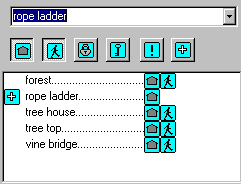 An example of the variables list
|
|
Updated: March 10, 1999. Questions/comments on site to webmaster@kurtz-fernhout.com. Copyright © 1998, 1999 Paul D. Fernhout & Cynthia F. Kurtz. |